
Categories
iPhone user experience UX

iOS Messaging improvements subtle but powerful.

This article about the iOS8 Message app has a lot of great insight about how one can improve a commonly-used feature , and the importance of attention to detail. The genius of this change is that they added an amazing amount of power, but what the user sees is not so different from iOS7 that they would get lost.

The only downside is that the change isn’t easy to discover for everyone. Tap and hold is pretty common now — he points out that many messaging apps like WhatsApp have it, and it’s something that Pinterest uses as well — but it’s not always clear in an interface what things support it.

These instantly sent pieces of media are also ephemeral. You have to explicitly ask to save them, or they self-destruct after 2 minutes.

tl;dr – if you tap and hold on the microphone or camera icon in your iMessage screen, you can send voice or pictures or video without launching another app. They’ve also made tapping on the camera icon show you the most recently taken photos so you can send them without searching. Easy-to-miss, but smart changes.

Categories
iOS development iPhone Mobile News

Mobile Links for week ending April 5, 2014

An analysis of apps in the Apple App store by price, ratings, etc. Some interesting insights, including that 60% of the apps in the app store have no ratings.

WWDC 2014 tickets will be offered via a lottery You have until 10am PDT April 7 to register for a chance to attend, and people will be notified that evening. Given the limited size of the conference, which has maxed out at 5000 attendees to maintain a 5 attendees-per-Apple-engineer ratio, this is my first chance to go in years.

This analysis of Apple’s Arm processor micro architecture suggests that there is a lot of untapped power that iOS apps aren’t using yet.

This new tool provides a quick way to generate code to animate iOS transitions.

With Amazon’s new Fire TV and a rumored new offering from Google soon, this may very well be the year that iOS apps move to the Apple TV. The LA Times compares the current crop of TV boxes here.

Clearly the streaming media race is heating up: Amazon is rumored to be going after Spotify with a new streaming subscription service soon.

Speaking of Spotify, their newest version on iOS is beautifully designed, and very in-line with the iOS 7 aesthetic, with a content-forward look-and-feel. I haven’t had time to completely explore it, but really like what I see so far.

Microsoft has announced Cortana, their answer to Siri and Google Now. While the reference to the character from Halo probably resonates with the Xbox crowd, it seems like an obscure choice to pick for an already underdog mobile platform. I had no idea who Cortana was myself, having never played Halo. The interesting thing about the feature is that it’s powered by Bing — this may be the time for Bing to actually shine, the Bing team has some great technology that has been largely ignored, but maybe mobile is the right venue.
.

Categories
Comics iPhone Mobile News

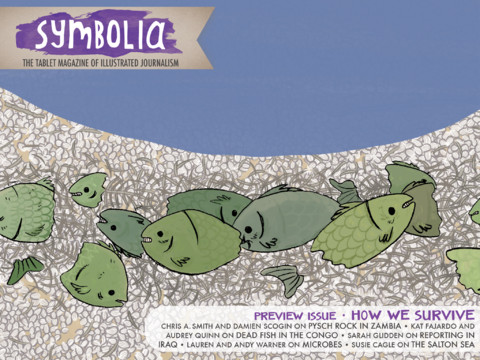
New iPad magazine showcases graphic journalism

The comics medium has been used for journalism for a while now. Joe Sacco’s Palestine is a prime example; a personal and immediate first-hand account of life in the occupied territories.

Symbolia Cover ArtSymbolia magazine takes this form of journalism to the iPad as a Newsstand app.

Symbolia is available in the iOS App Store. Download is free, an annual subscription is $11.99 for 6 issues. Single issues will run $2.99. The app comes free with the preview issue, which showcases Susie Cagle’s piece on the Salton Sea.

Newsstand Icons
Newsstand Icons are rendered differently from normal apps, like the Zinio icon at left.
Apple’s Newsstand is a very underrated iOS feature. Newsstand apps are essentially iOS apps with additional privileges that allow pushing of new content to your device so that the latest issue is available to you offline. Apple hasn’t promoted Newsstand much, but there are an impressive number of major titles available, including the New York Times, Sports Illustrated, Esquire, Wired, and others. You can easily differentiate Newsstand apps from others on the app store by their icons; instead of the rounded square icons, Newsstand apps are rendered to look like magazines or newspapers. It’s a good thing, too, as the ‘store’ feature in Newsstand is kind of broken.

Ironically, today News Corp. announced that they are shutting down The Daily, but tablet-based magazines such as Symbolia and Marco Arment’s The Magazine seem to be gaining momentum. The Magazine is already profitable, has hired an editor, and increased its rates for writers. The economics of these magazines are very compelling in comparison to print magazines, and the barriers to entry have never been lower.

Categories
iOS development iPhone Mobile News social shopping user experience UX

Mobile Links for week of November 25-30 2012

Android shopping traffic lags behind iOS, despite the larger number of devices. GigaOm asks why:
Why are Android users less engaged than iOS users?

Nice detailed graphs and links to several good stories on the topic. I do take issue slightly with the idea that “willingness to buy stuff == engagement”; everyone buys devices for different reasons. But if you are writing shopping apps or marketing your business on mobile devices, it’s important to understand the different types of users and the strategies that work best on each platform.

IDC: Developer Disinterest Could Kill RIM & Windows Phone Ya think? Out of all of the companies I’ve interviewed lately, only a couple are planning to put their apps on Windows Phone, and nobody is planning to support BlackBerry.

11 Apple iPads per hour vs. zero Microsoft Surface tablets Schadenfreude aside*, this is a significant indicator about what a misstep it has been for Microsoft to sidestep its OEMs.  They don’t have nearly the distribution network they need to go it alone.   Also, Surface exemplifies how badly MS has misread the tablet trend; it’s not about the hardware, its about reducing the computing experience to something that is quick and pleasurable.  Shoehorning desktop Windows onto a tablet barely capable of running it fails both tests.

*Actually, I’m not enjoying this at all,  I’m a Microsoft shareholder, and my investment has seen no growth, while my Apple stock has gone through the roof.  Steve Ballmer has got to go.

In BII MOBILE INSIGHTS: Mobile Technology May Define The Future Of Healthcare, PriceWaterhouse Coopers presents a video talking about how mobile is influencing healthcare.      The other links/reports on this page are pretty good, too.

Categories
iOS development iPhone

Think Alike

Apparently apple has already patented one of the things on my personal wish list for the iPad: a conductive stylus that transmits pressure and or tilt information. This type of a pen would basically turn the iPad into something like a Wacom Cintiq, at a fraction of the cost and with far better portability.

Up to now, drawing on the iPad has basically been fingerpainting, though several of the drawing apps have taken some novel approaches. Sketch Club, for example, can use your drawing velocity to control the line. Though there are styluses which you can use with the iPad now, none can support pressure or tilt sensitivity. Because of the way the iPad handles touch events and gestures, this has to be directly supported in iOS. While many of the drawing programs for the iPad are already pretty good, pressure sensitivity is a must for any serious professional drawing program, especially those that mimic traditional art materials such as charcoal.

This article goes into a lot more detail about their approach. This particular approach requires a special pen with a conductive disk tip that can trigger the touch panel sensors more effectively.

Categories
iOS development iPhone

It’s the little things

Attention to detail is very important in the user experience for mobile apps. Here’s an example (courtesy of Daring Fireball) from the iOS email program. It’s a small thing, but these behaviors add up to a very polished whole.

This blog, ‘The Invisible’ is brand new, with just two postings, but is a very promising look into the little details which drive the fit and finish of user interfaces. The first entry, about tab closing in Google Chrome, is also very enlightening.